




July brought a strong set of updates focused on billing visibility, platform control and scalability. Whether you’re managing a large team, reconciling invoices against cost centres or looking for greater confidence in how your candidate and referee communications are delivered, this month’s release has something for you.
New features and updates
New Billable Items report added to the reporting suite
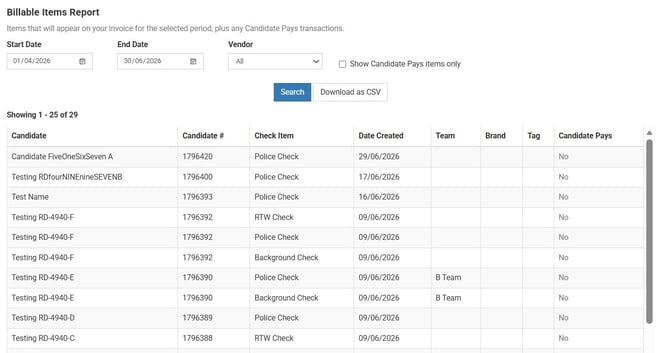
Getting a clear picture of your background check spend and allocating it accurately across teams, brands or cost centres just got significantly easier with the new Billable Items report.
Available under Reporting, the report gives you full visibility into the background checks you will be billed for in a given period, making it straightforward to reconcile billing and identify usage trends. The report includes candidate name, candidate number, check item, date created, team, brand, tag and whether the check is candidate-pays, so you can slice the data in a way that maps to your internal structure.
Update to automated data redaction functionality
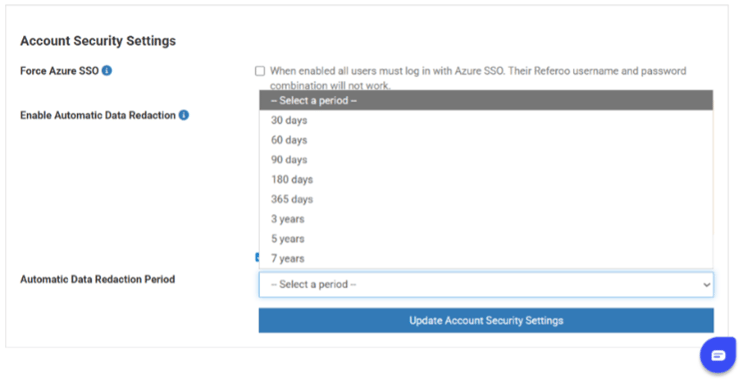
You now have direct control over your automated data redaction settings from within the platform, without needing to contact us to make changes on your behalf. Data redaction enables candidate and referee data to be anonymised.
Settings can be managed by navigating to Settings → Account Settings → General Settings → Account Security Settings.
Note that once the data has been redacted, it is permanently removed. Please contact your Account Manager if you have any questions before turning on this feature.
Candidate and referee email improvements
Your candidate and referee communications will now look and feel more consistent with your organisation’s brand and are less likely to be caught by spam filters.
The ‘from’ address on candidate and referee emails has been standardised to your custom username, with reply-to set to candidates@ or referees@ as appropriate. This means emails sent through the Referoo platform will appear to come directly from your organisation. For more information, please refer to our Help article on Setting up a Customer Sending Domain.
Updates to the custom check complete emails – NCC police check results
We have made an update to the NCC police check results. The direct download link that previously allowed you to retrieve the police check result PDF directly from the email will no longer be included.
This change has been made to strengthen the security of how police check results are accessed and to ensure document distribution meets current compliance standards.
Police check result PDFs remain available in full and can be accessed at any time directly from the candidate record.
Why have we made this change?
We take our responsibilities around data security and compliance seriously, particularly when it comes to sensitive documents like police check results. This change has been made for two key reasons:
1. Stronger security
A direct download link in an email can be forwarded, accessed from an unsecured device, or intercepted. By removing it, we ensure that police check results can only be accessed by authenticated users who are logged into the Referoo platform, significantly reducing the risk of sensitive documents ending up in the wrong hands.
2. Better compliance
Police check results contain sensitive personal information that is subject to strict handling requirements under privacy legislation. Accessing these documents through a secure, authenticated platform creates a proper audit trail of who accessed what and when, and ensures that result documents are handled in line with our obligations and yours.
Other updates
- Word document support for reference reports - Clients can now receive reference answers injected into a custom Word template instead of the standard PDF, with support for placeholders and custom tick/checkbox values.
- Enterprise-scale account management – For organisations managing large numbers of users, the platform now scales to support enterprise volumes of child users under a single parent account.
- Packages now displayed alphabetically – Packages are now sorted alphabetically in the candidate creation form package dropdown, making it faster to find the right package.
- Notification when a referee has unsubscribed – Users and candidates will now be notified when a referee has unsubscribed from communications, so references are no longer at risk of stalling without anyone being aware.
- Action Log now records report downloads – The Action Log now captures who downloaded a reference report, including whether it was a user or a referee, along with a timestamp, giving you a clearer audit trail of report access.
That’s a wrap for this month!
We'll be back next month with the latest updates and improvements. Have a feature request or suggestion? We'd love to hear from you. Please share your ideas here: Product & Feature Requests.