




August brings some of our most exciting updates yet! The headline feature is the new Questionnaire Uploader - a smarter, faster way to build questionnaires that puts the power directly in your hands. Alongside that, we've made meaningful improvements to the Talent Pool, referee email handling and questionnaire logic.
New features and updates
Questionnaire uploader
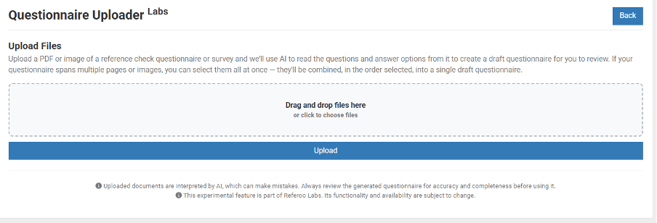
Say goodbye to manually recreating questionnaires from scratch. You can now upload an existing form, whether that's a PDF, a scan, or even a photo, and let AI do the heavy lifting. It reads the document and automatically reconstructs the title, questions, sub-questions and question types (comment boxes, multiple choice, ratings) as a fully editable draft in your Questionnaire Builder, ready for you to review and refine before anything goes live.
What used to take hours now takes minutes, and the result is yours to tweak until it's exactly right.
This feature is available to Referoo Hub clients. Get in touch with your Account Manager to have it enabled.
Talent pool enhancements
A number of improvements have been made to the Talent Pool feature this release:
-
LinkedIn sign-off how recorded in reference report and action log - Where a referee has authenticated via LinkedIn, this now appears on the reference report and in the action log, improving the audit trail when LinkedIn verification is used.
-
CV upload at referee opt-in - Referees opting into a talent pool can now attach a CV (PDF/Word), accessible to you from the Talent Pool list and exports. A clear explanation is shown to the referee at the point of upload so they understand how their CV will be used. Useful if you want want richer information on potential leads before reaching out.
-
"Contacted" checkbox - You can now mark a referee lead as contacted, making it easier to track outreach progress.
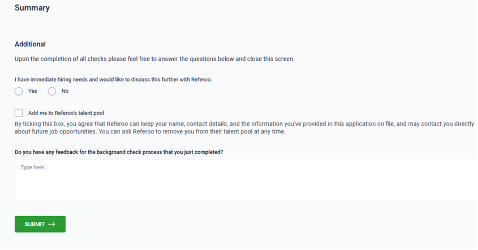

Improved referee email validation
Incorrect referee email addresses have been a common cause of delayed or stalled references. Referee email addresses are now validated at the point of entry, with inline error messages for formatting errors and suggested corrections for common domain typos (such as gmial.com or outlok.com).
If a request bounces after sending, the candidate is automatically notified with a link to update the address and the request is resent once corrected. Users are notified of bounce events via in-platform and email alerts, and all changes are logged in the audit trail.
Questionnaire Logic: mandatory comments on batch ratings
You now have greater control over how referees respond to rating questions, helping you capture the context behind scores that matter most to your team.
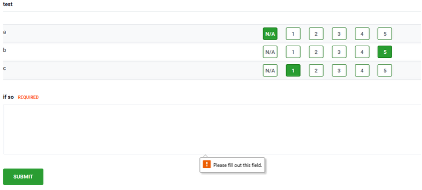
A new “Require” action has been added to Questionnaire Logic alongside the existing Show and Hide options. For batch-of-ratings questions, you can now configure a comment box to become mandatory whenever specific ratings are given, for example, requiring a written explanation whenever a referee selects N/A, 1 or 2. This means you are less likely to receive low ratings without the context needed to act on them.
Candidate & referee signature box improvements
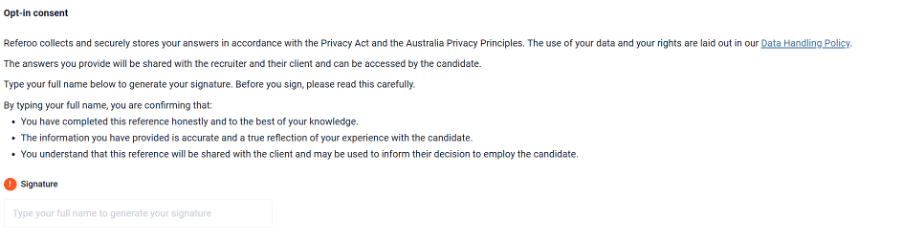
We've updated the signature box placeholder text to "Type full name to generate signature" and added clearer wording so referees know exactly what they're agreeing to before they sign.
UK Updates:
Mitek UK: liveness-failure flag and notifications
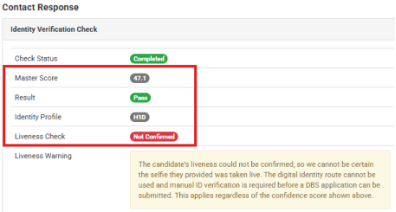
If a DBS identity check fails the liveness check and needs manual ID verification, this is now clearly flagged on the candidate profile and identity report. You'll get an automatic notification, and so will our support team so nothing slips through.
New developer user account type
You can now create a restricted account for a third party, such as an integration partner, so they get API access without your main account login or your existing candidate and referee data. It's a safer way to set up integrations without handing over full account access.
Other updates
- Candidate continue URL for NCC police and RTW checks – The candidate continuation link has been removed from the Candidate Profile following updated guidance from our accredited provider, NCC. To ensure ongoing alignment with ACIC requirements, this link is intended solely for the candidate's use. If a candidate has not completed their check, they can continue their police check at any time by logging back into their Referoo candidate dashboard. The link continues to display for NCC RTW / VEVO – only checks.
- Eligibility Status now displayed in WWCC checks – WWCC results now display the provisional or interim bar status across all States and Territories. This is a temporary restriction placed on a person’s ability to work with children while a full risk assessment is being conducted and appears as an additional status alongside the main check result.
- Candidate and referee signature box improvements - The signature box placeholder text has been updated to read “Type Full Name to Generate Signature”, and referees are now shown clearer wording upfront explaining what they are consenting to before signing.
- Candidate citizenship from Referoo RTW checks passed to Dayforce – Referoo now works out candidate citizenship from any Referoo police and RTW checks and passes it through to Dayforce.
- Confirm contact details added to Action Log - When a candidate completes the Confirm Contact Details step, this is now recorded as a timestamped entry in the Action Log, improving your audit trail.
- Konfir results pushed to Bullhorn – Completed Konfir reports can now be automatically sent to the Bullhorn candidate record.
- PageUp: Ability to choose candidate owner – PageUp users can now set the recruiter, hiring manager and requester within PageUp, ensuring the right person owns and manages the candidate record.
- Editable reference check disclaimer for UK and Ireland - The reference check disclaimer is now editable to support GDPR/Data Protection Act compliance.
- Dayforce billing codes – Dayforce users can now manage billing codes against packages within the Dayforce Settings page.
That’s a wrap for this month!
We'll be back next month with the latest updates and improvements. Have a feature request or suggestion? We'd love to hear from you. Please share your ideas here: Product & Feature Requests.