




September’s release is all about visibility and control. This month we’ve focused on giving you and your candidates more transparency throughout the reference process - from seeing exactly when a referee opts into your Talent Pool, to knowing straight away if a referee can’t be reached. There’s also a strong set of improvements to reporting and candidate dashboards.
New features and updates
Talent Pool enhancements
Your Talent Pool just got significantly more powerful. This month’s release brings a series of updates designed to give you better quality leads, more context on each referee and smarter tools to manage your outreach - all without adding friction to the reference process.
-
Opt-in date now captured and displayed - You can now see exactly when a referee opted in to your Talent Pool, surfaced wherever talent pool data is viewed or exported. This gives you a clearer picture of lead freshness and helps you prioritise outreach more effectively.
-
Clearer consent language - The wording shown to referees at the point of opt-in has been updated so they clearly understand what they are agreeing to, giving you greater confidence in the quality and intent of your leads.
-
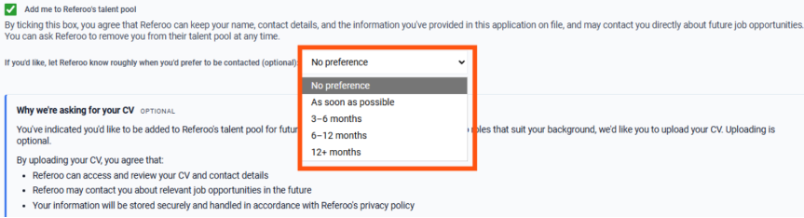
Referee preferred contact timeframe - Referees can now select when they would like to be contacted: “As soon as possible”, “3–6 months”, “6–12 months”, or “12+ months”. This is displayed in your Talent Pool view so you can time your outreach to match each referee’s availability. Referees who don’t make a selection will show as “Not specified”.
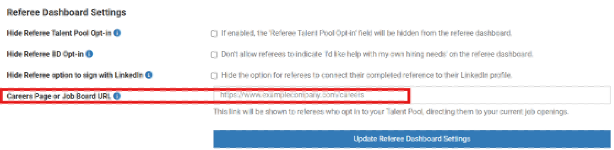
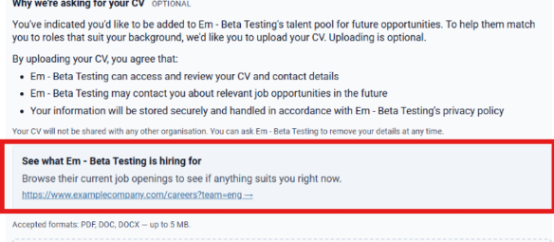
- Careers page link on opt-in confirmation - The referee opt-in confirmation screen can now include a link to your careers page or job board, directing genuine interest straight to your live roles. A referee who clicks through is a much stronger lead. To add your URL, go to Settings → Account Settings → Referee Dashboard Settings → Careers Page or Job Board URL.
Candidate Dashboard now shows referee communication status
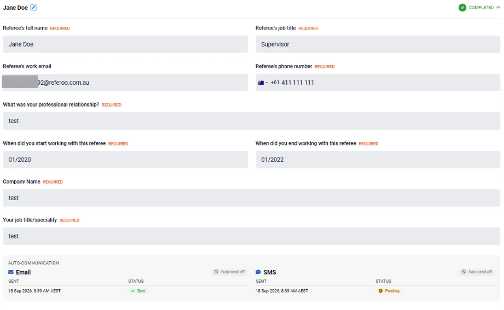
Candidates can now see exactly what’s happening with each of their referees, giving them the visibility they need to chase up directly and keep their reference process moving.
Each referee card on the Candidate Dashboard now includes an Auto-Communication section, showing whether SMS and email auto-contact is switched on, plus a timestamped log of every contact attempt and whether it was delivered.
Candidates and recruiters notified when a referee cannot be reached
You’ll now be alerted if a referee cannot be contacted, so nothing stalls silently and you can take action before it causes delays.
Both you and the candidate are now notified whenever every contact channel for a referee fails. Previously, only email failures triggered a notification, meaning an SMS failure or unsubscribed referee could go unnoticed entirely. If all contact attempts fail, the referee shows as “not contacted” (red referee box). If one channel fails but another succeeds, the referee shows as “awaiting response” (yellow referee box) with an email explaining what went wrong.
UK Updates:
Clearer DBS file-format guidance and BRP option removed
Candidates completing a DBS identity check will now see clearly which file formats are accepted (PDF or JPG) on the document upload screen. The Biometric Residence Permit (BRP) option has also been removed, as it is no longer a valid document type for this check.
These changes address two common points of confusion that were causing candidates to stall or upload incorrect files, helping the DBS process run more smoothly for your team.
Konfir information added to candidate dashboard
A short explanation and trusted links have been added to the candidate dashboard for Konfir checks, so candidates understand what Konfir is, what information may be requested and how the process works before they get started. This should reduce drop-off and confusion for candidates asked to complete Konfir checks.
Other updates
- Referee phone number can now be made optional - A new account setting allows candidates to submit a referee without a phone number, as long as an email address is provided. When combined with the existing “Referee Email Field Optional” setting, at least one of the two will still be required. To enable: Account Settings → General Settings → Candidate Dashboard Settings → Referee Phone Number Optional.
- Billable Items Report: column updates - The “Date Created” column has been renamed to “Date Billed”, and a Client Company column has been added, making it easier to reconcile and chargeback completed checks to the correct cost centres.
- Pre-populate Client Company field when creating a candidate - The Client Company field can now be pre-populated based on account settings, saving you from entering it manually each time. To enable: Configuration Settings → User Dashboard → Pre-populate ‘Client Company’ Field → On. The value can still be overridden when needed.
- Candidates can enter a previous name for referee identification - Candidates can now add a previous name (such as a maiden name) so referees who knew them under that name can recognise who the reference request is for. This helps reduce non-responses caused by a candidate’s name having changed since they worked with the referee.
- Candidate address now included in Candidate Summary Report - The Candidate Summary Report now includes the candidate’s address, pulled from the DBS check for UK clients and Referoo’s police check for AU clients.
- Enhancements to Referoo’s police check workflow:
- Results now included in Candidate Summary Report - Referoo police check results are now displayed inline within the Candidate Summary Report.
- Manual address entry fallback- If Google Maps fails to load on the address history page (for example, on a corporate network), candidates can now manually enter their address history.
- Middle name warning - If a candidate has a middle name on their verified record but omits it when entering a previous or maiden name, they will now see a prompt to double-check.
That's a wrap for this month!
We'll be back next month with the latest updates and improvements. Have a feature request or suggestion? We'd love to hear from you. Please share your ideas here: Product & Feature Requests.